Reading through the copy edits of Day by Day was one of the most humbling experiences. I didn’t realize how much I needed a personal copy editor until the copy-edited manuscript arrived on my doorstep. Reading through the copy editor’s notes and corrections, I learned several things about myself:
- I had a bad habit of using the word that when it wasn’t necessary.
- I started many sentences with the word additionally instead of writing in addition.
- I often write in the passive voice.
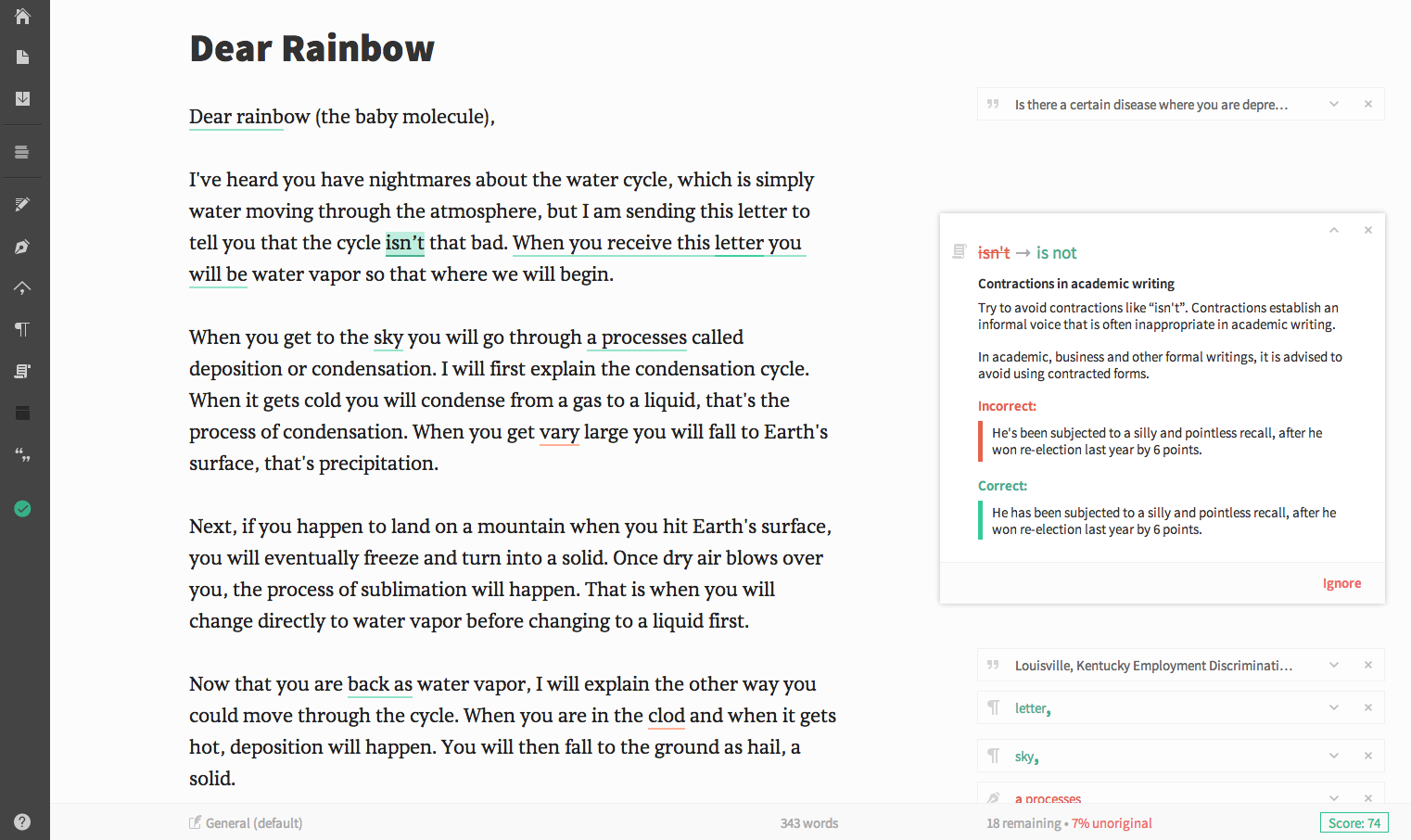
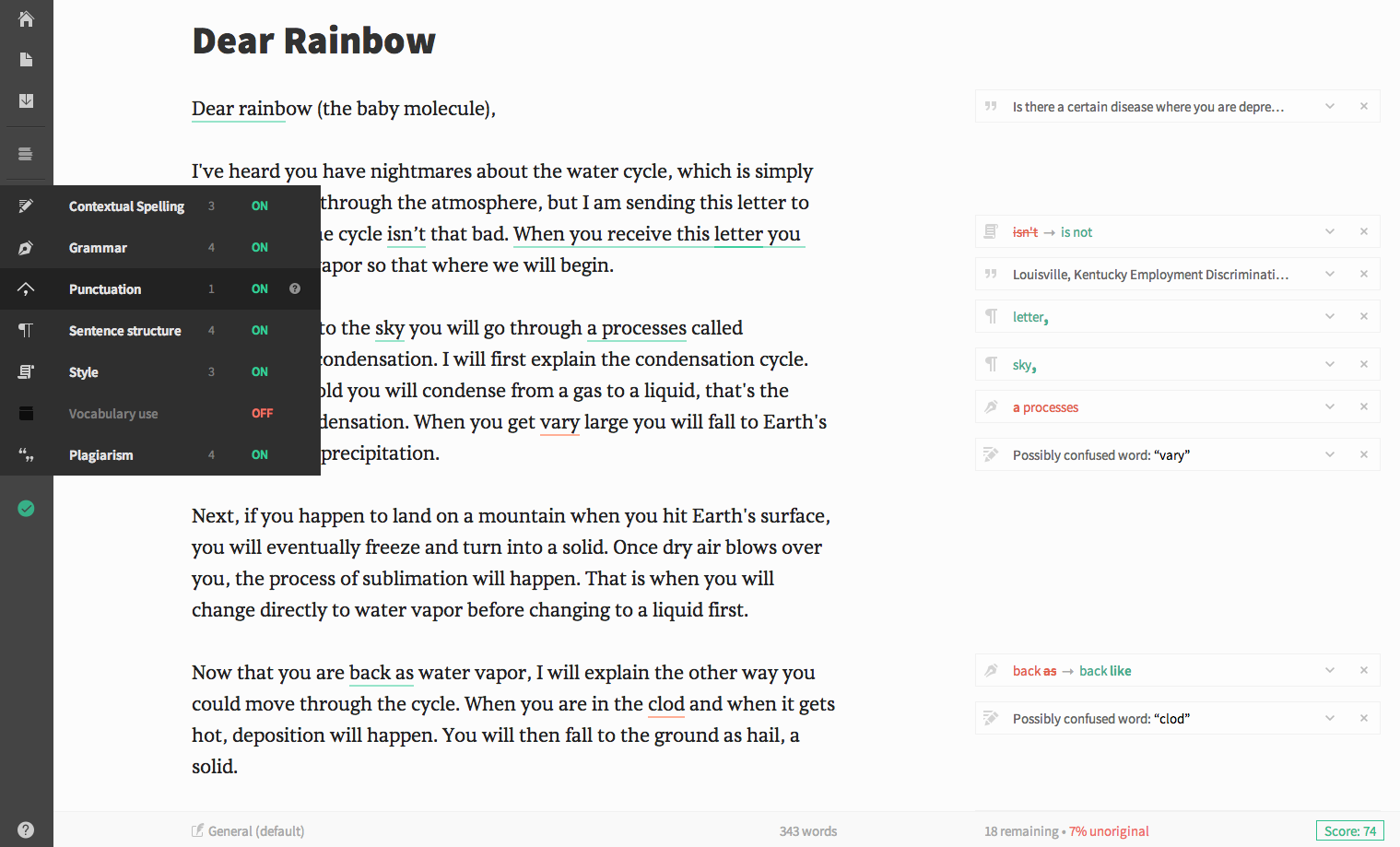
I’ve long been one of those people who can spot other people’s mistakes, but don’t always find my own. In January, I tried out Grammarly, which is a proofreading web application that finds and explains in-depth grammar, spelling, and punctuation mistakes online. I downloaded the plugin for my Chrome browser so I could proofread everything from blog posts to tweets. In addition, I downloaded the Grammarly add-in to Microsoft Office so I could use it while writing on Craft Moves. Over the course of the past four weeks, Grammarly picked up LOTS of my errors and as taught me a few more things about myself as a writer.
- I split infinitives.
- I start some sentences with the word this, which is an unclear antecedent.
- I write wordy sentences.
- I still write in the passive voice way too often.
I’ve LOVED having a virtual copy editor. I don’t always agree with the corrections Grammarly wants to make. However, it picks up way more errors than it introduces, so I greatly appreciate having it as a tool.
GRAMMARLY IN THE CLASSROOM:
I contacted the folks at Grammarly, and Michael Mager, who is an Online Marketing Analyst at Grammarly, got back to me. I wanted to know how to use Grammarly in the classroom. Here’s what he said:
Middle school is a critical time for students to learn and develop their writing skills, and Grammarly complements these efforts. Grammarly provides students with specific and actionable feedback on their spelling and grammar mistakes — helping to break bad writing habits. Our Grammarly Chrome browser extension, launched in January, highlights writing mistakes in students’ emails, Facebook messages, and in other places they are writing online.


- Grammarly is donating a free, one-year premium account to their site for one person who leaves a comment on this post.
- For a chance to win the premium Grammarly account, please leave a comment about this post by Wednesday, March 4th at 11:59 p.m. EDT. I’ll use a random number generator to pick the winners, whose names I will announce at the bottom of this post, by Friday, March 6th.
- Please be sure to leave a valid e-mail address when you post your comment, so I can contact you to obtain your mailing address if you win. From there, my contact at Grammarly will set up the account for you. (NOTE: Your e-mail address will not be published online if you leave it in the e-mail field only.)
- If you don’t win, do check out the Chrome extension, which is free! This means you can try out the basic version of Grammarly, which checks for 100 writing corrections and suggestions even if you don’t win.
- If you are the winner of this giveaway, I will e-mail you with the subject line of TWO WRITING TEACHERS – GRAMMARLY. Please respond to my e-mail with your mailing address within five days of receipt. Unfortunately, a new winner will be chosen if a response isn’t received within five days of the giveaway announcement.
Comments are now closed. Thanks to everyone who left a comment.
I used a random number generator and jbmiller73’s commenter number came up. She said:
I have been thinking of trying this site out. I am glad to get your two thumbs up! I see a subscription to Grammarly in my very near future!
Discover more from TWO WRITING TEACHERS
Subscribe to get the latest posts sent to your email.


Writing and journaling is what I find myself doing quite often. Grammarly would be great to use.
LikeLike
I follow Grammarly on FB, and I love their jokes. I’d love to win, too.
LikeLike
I think this is great! I am going to check into this. I need a copy editor.
LikeLike
I am so guilty of many grammar errors in my own writing that I somehow easily see when I read other people’s work. As I start my quest of being a writing teacher who is a writer Grammarly will really help. Thanks for the information.
LikeLike
Wow! I’m downloading the app. Sounds like an amazing tool for middle school kids and me. Thank you Stacey!
LikeLike
Grammarly sounds perfect! Thank you for the information.
LikeLike
My students are embarking on a research unit next week. Their research up to this point has been very limited. Grammarly would be an invaluable classroom tool for them to use.
LikeLike
I’d love to check out Grammarly! In addition to grammar mistakes, my brain sees what I WANT to say, and not all my typos – which are numerous:-( It sounds like it would be a great help.
LikeLike
I need Grammarly! As my students have now become writers than myself:)
LikeLike
This looks amazing! I would love to use it for my own writing and to show my students!
LikeLike
I have heard of Grammarly but never tried it. I will definitely be checking it out. I can see where it would also be an INVALUABLE tool for my soon-to-be high school son who struggles with dyslexia. Anything that will help him with the writing process is gold!
LikeLike
This is really cool! I will have to try it! This would be especially useful if my real copy editor is unavailable!
LikeLike
It sounds much less intimidating than a teacher with a red pen!
LikeLike
Thank you for sharing this website and writing tool! I will definitely check out the chrome extension and try it out on my school computer 🙂
LikeLike
Wow! I would love to have a subscription!
LikeLike
This is the second time this week that someone has recommended using Grammarly! I think it’s a sign – I need to check it out!
LikeLike
I’m an author of several published novels, but have never heard of Grammarly. I’ve seen their quotes on FB pages, but I didn’t realize it was a software for writers. (Where have I been?) I’d love to have this tool! Thanks for all you do here. I tell teachers about this blog all the time. (Honestly. I’m not just saying that to improve my chance at winning either! Lol)
LikeLike
Wow, it would be interesting to find out my writing habits in the area of grammar. Sounds like an extremely helpful tool!
LikeLike
I didn’t know how much grammar is involved in editing a book. This would be something very useful!
LikeLike
This sounds like an incredible resource! I will definitely check it out! Thank you for sharing!
LikeLike
I too, love to read the stories from other people’s lives….their best first draft, however, I know that would love to improve my grammar and learn more about it. I once read an article from a journal that said, that our brains really don’t understand grammar until we are older. Who ever said, “you can’t teach an old dog new tricks” ? I definitely need this awesome tool. Thank you for sharing. xo
LikeLike
Grammarly sounds like a web application that would benefit all.
LikeLike
Grammarly sounds heavenly. I try really hard to make my sentences to make sense. I have recently began to write in my writer’s notebook. This would help me improve and understand myself as a writer.
LikeLike
Grammarly would fit in great with my staff development that I am leading this semester. We are reading “Mechanically Inclined” by Jeff Anderson and focusing on how we can more intentionally incorporate grammar and mechanics instruction into our writing workshop as well as into our read alouds and so much more. I’m going to check out the app right now!
LikeLike
Grammarly would be perfect for me! I do my best editing after I hit send or post! 🙂
LikeLike
Wow, this looks like a great app that I definitely need. It would also be amazing for students to use.
LikeLike
Interesting – I would love to give Grammarly a try. i know I have lots to learn and this would be great.
LikeLike
Students don’t always take the advice of parent or teacher, perhaps they would consider the correction if it came from Grammarly. I am interested in reading how it explains the suggestions.
LikeLike
I have been thinking of trying this site out. I am glad to get your two thumbs up! I see a subscription to Grammarly in my very near future!
LikeLike
Oh My! I would love to experiment with Grammarly! I know I have a lot to learn!
LikeLike
I’m very interested in playing with Grammarly 😄
LikeLike
I would love to experience Grammarly! Thank you for setting up this possibility.
LikeLike
I love grammarly. It is the best invention to help learners and writers
LikeLike
This sounds great! I would love to use it myself and also let my daughter (college student) and son (11th grader) give it a try as well.
LikeLike
Excited to try this tool! Thanks for informing.
LikeLike
Where have I been? Grammarly sounds terrific. One of the reasons I like composing on the computer is that I can go back and correct/edit every time I reread. Sometimes, months later, I catch a glaring error on a blog post and cringe.
LikeLike
Hoping to give it a whirl soon and try it out. Thanks for sharing your experiences with Grammarly.
LikeLike
I have been using Grammaly for a few weeks and am amazed at the range of mistakes I have been making. I really appreciate how Grammarly doesn’t just suggest an edit but explains the suggestion!
LikeLike